
Planning our media mix is one of those things we all have to do as marketers. You enter a month, a quarter or a year with a plan for how much you want to spend on your different channels.
While you might have a plan at the beginning of the period, it's not a set-it-and-forget-it kind of thing. If you want to be the best, you should obsess over marginal ROAS (or CPA) for that day-to-day optimisation.
In this article, I'll explain marginal ROAS, how it is calculated, and how you can use it to guide your budgeting decisions.
What is marginal ROAS?
Marginal ROAS is a marketing version of the term marginal Return on Investment from the world of Economics. Since ROAS is simply the return on the marketing investment, we can use it to describe the same relationship for marketing investments.
Marginal ROAS is the rate of return for a marginal increase in ad spend.
In other words, the marginal ROAS describes the additional revenue we will generate if we increase our investments in a given channel.
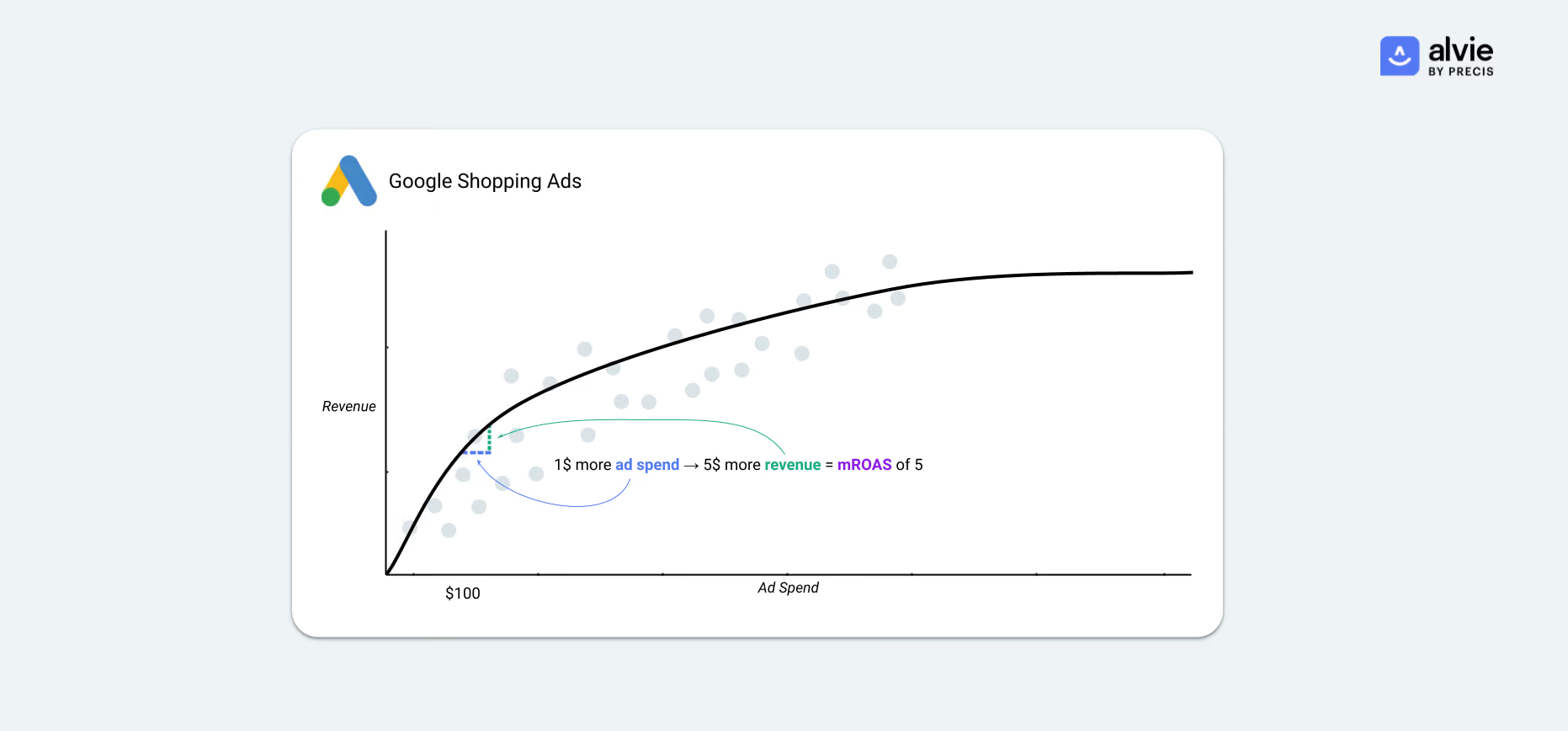
For example, if we're currently spending $100 per day on a channel and the marginal ROAS of that channel is 5, that means that if we spend 1 more dollar and increase our daily spend to $101 we will see our revenue grow by $5.
When we've calculated this number for all of our channels we can make much more informed decisions on where our investments would give us the most "bang for the buck".
How to calculate marginal ROAS
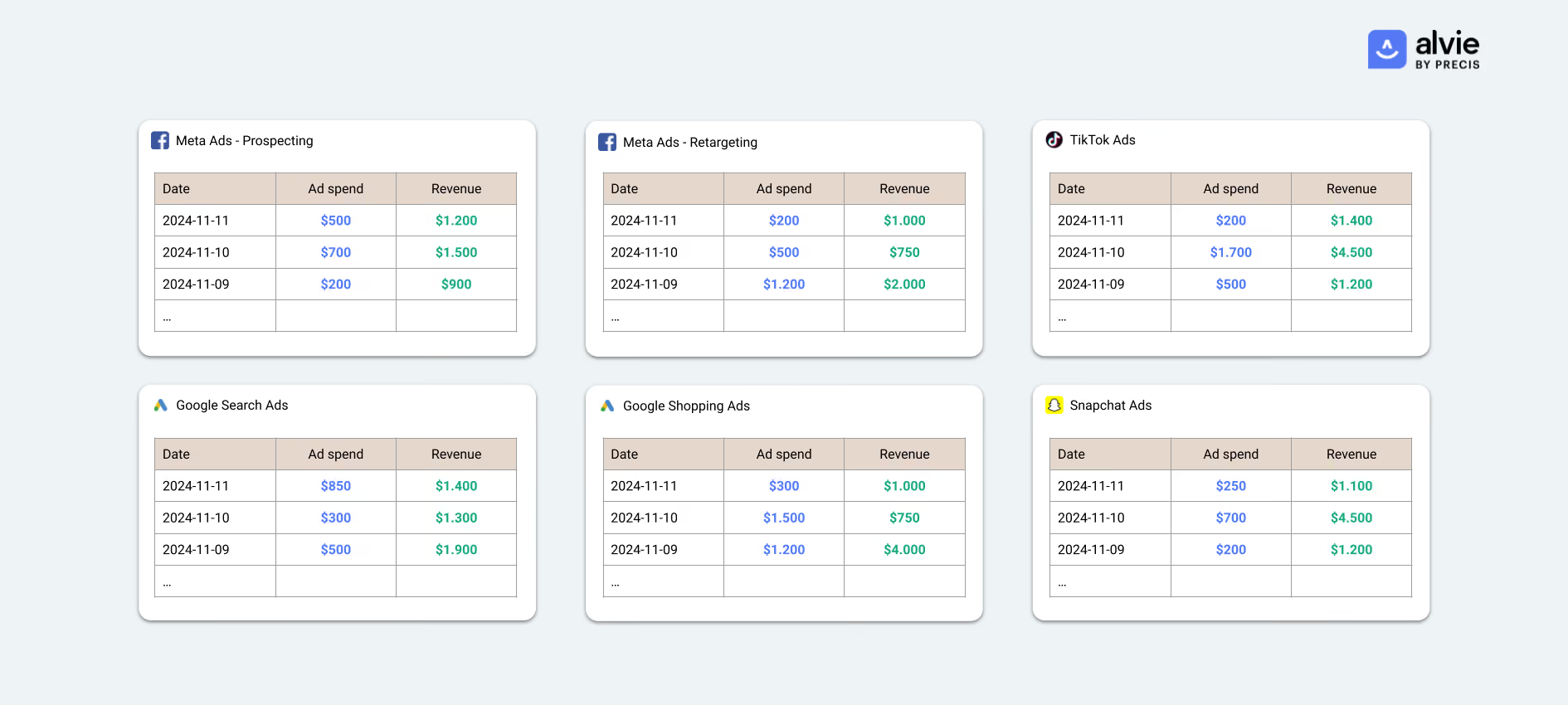
The first step towards calculating the marginal ROAS is to collect all your relevant marketing data in a way where you can draw the relationship between your marketing spend and revenue per channel.
Collecting marketing spend is pretty straightforward since you'll have a true number for how much money you've spent on the different channels, either in your marketing data warehouse or in the marketing platforms themselves.
Determining the revenue per channel, however, is not as straightforward. While the amount of money spent on ads is a fact (you bought those ads), the amount of revenue you got back from those ads is very debatable. The whole field of Marketing Attribution is dedicated to answering that question.
Whether you're relying on in-platform numbers like Google Ads conversions and Google Analytics attribution or you have a custom cross-channel model (like Alvie Attribution) you will need to collect the revenue per channel on a daily level as well.
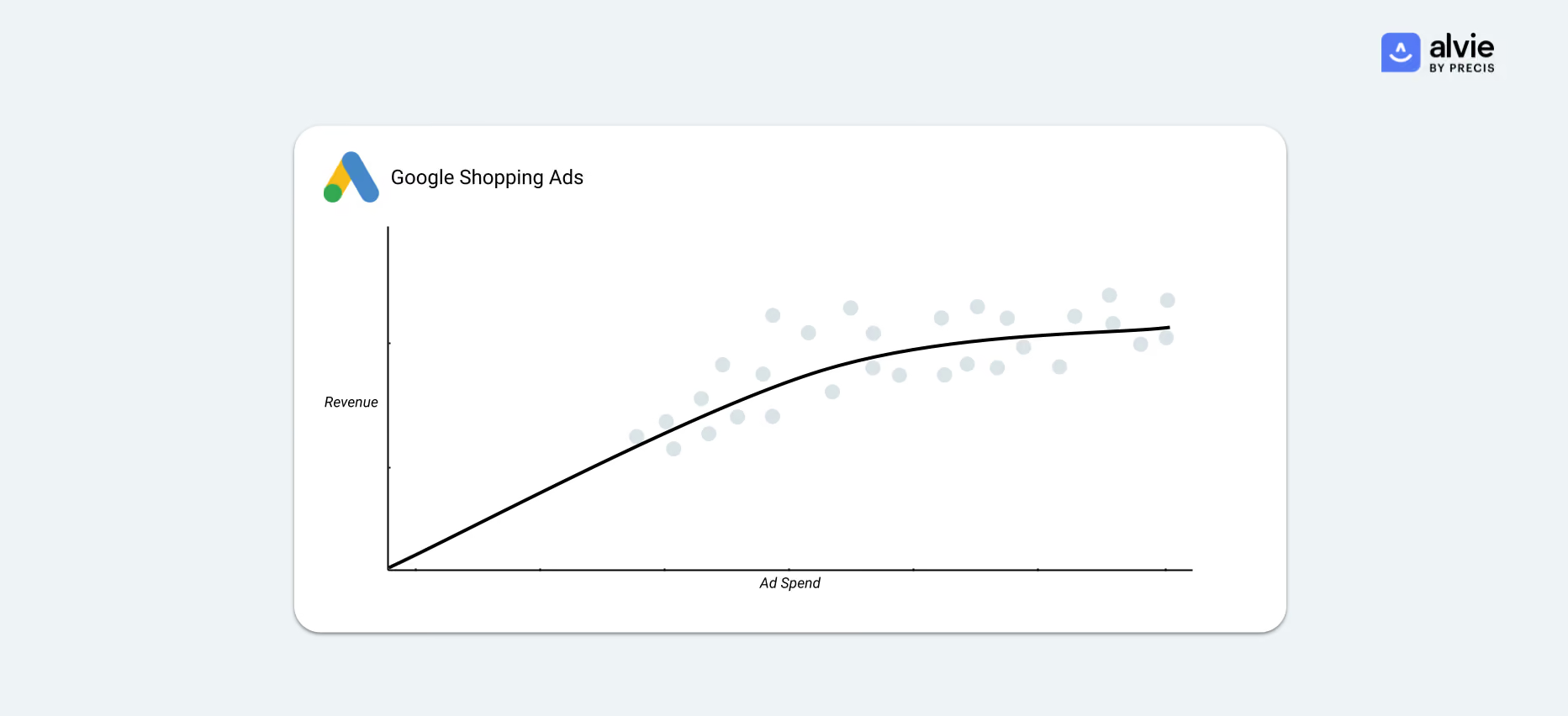
Once you've collected your data, you can draw the relationship between Ad Spend and Revenue. There are a multitude of ways to draw these curves. The approaches range from basic methods like Exponential or Logarithmic trendlines in everyday tools like Google Sheets, to advanced marketing-specific modelling methods like Bayesian Regression with PyMC or Meta's Robyn.
When you've modelled the relationship between spend and revenue like the above, you can calculate the marginal ROAS by determining the slope of the tangent at the point of your current ad spend.
We can calculate this slope by finding the (x, y) coordinates of our current ad spend and comparing them with the point one spend level up on the line - i.e. (x+1, f(x+1)). When we have those two points, we can plot them into the two-point form of the equation of a line to calculate the slope.
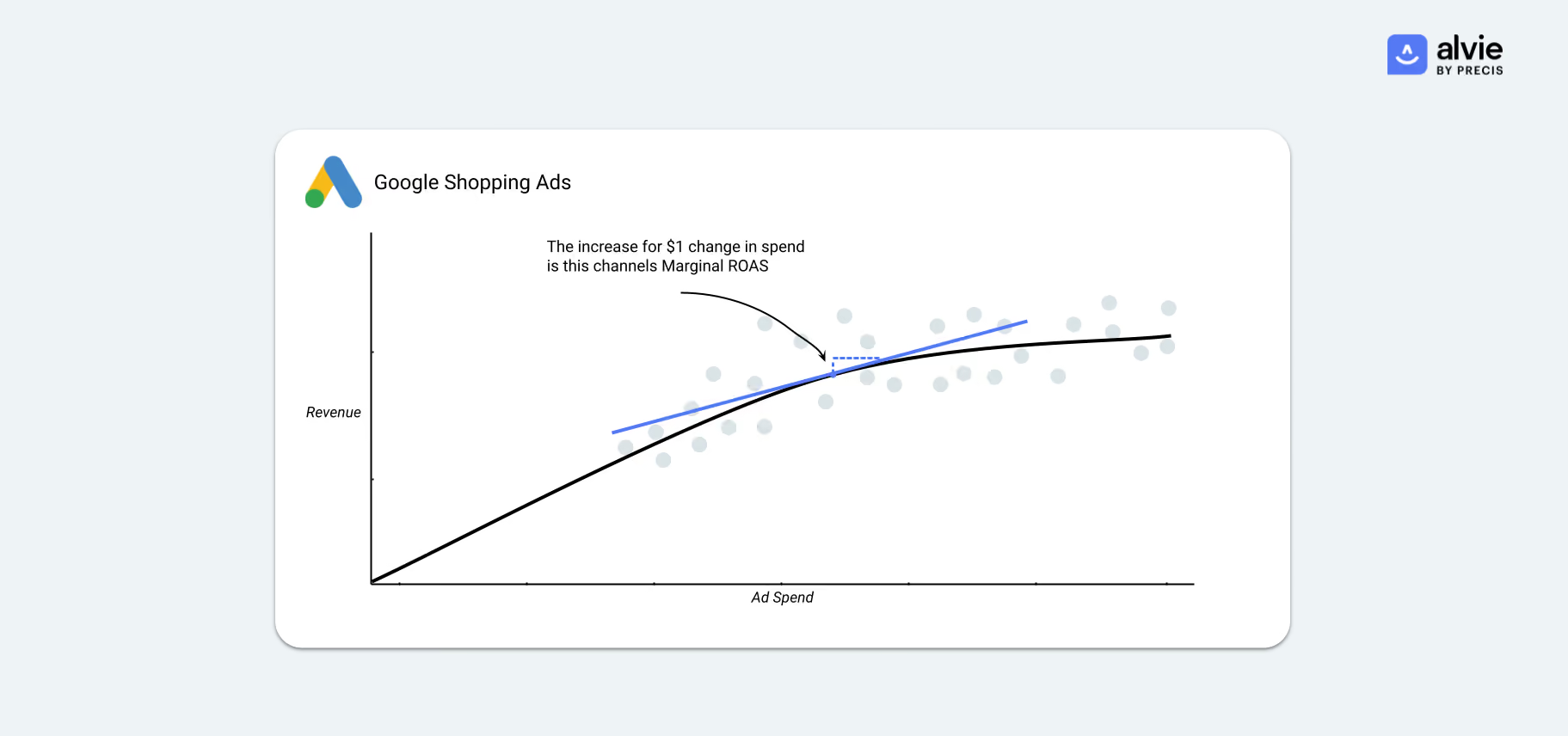
The slope of the calculated line is our marginal ROAS, which we can now calculate for all of our channels.
How to use marginal ROAS to make budgeting decisions
As mentioned previously, the Marginal ROAS is a way to describe how much money we'll get for the next advertising dollar spent.
We can use the marginal ROAS per channel to determine where we should be spending our budget
If we're looking to increase our marketing investment, we can look at the channel with the highest marginal ROAS and know that this is where we'll get the most revenue out of putting our investment. Similarly, we can look at the channel with the lowest marginal ROAS if we're looking to decrease our marketing investment.
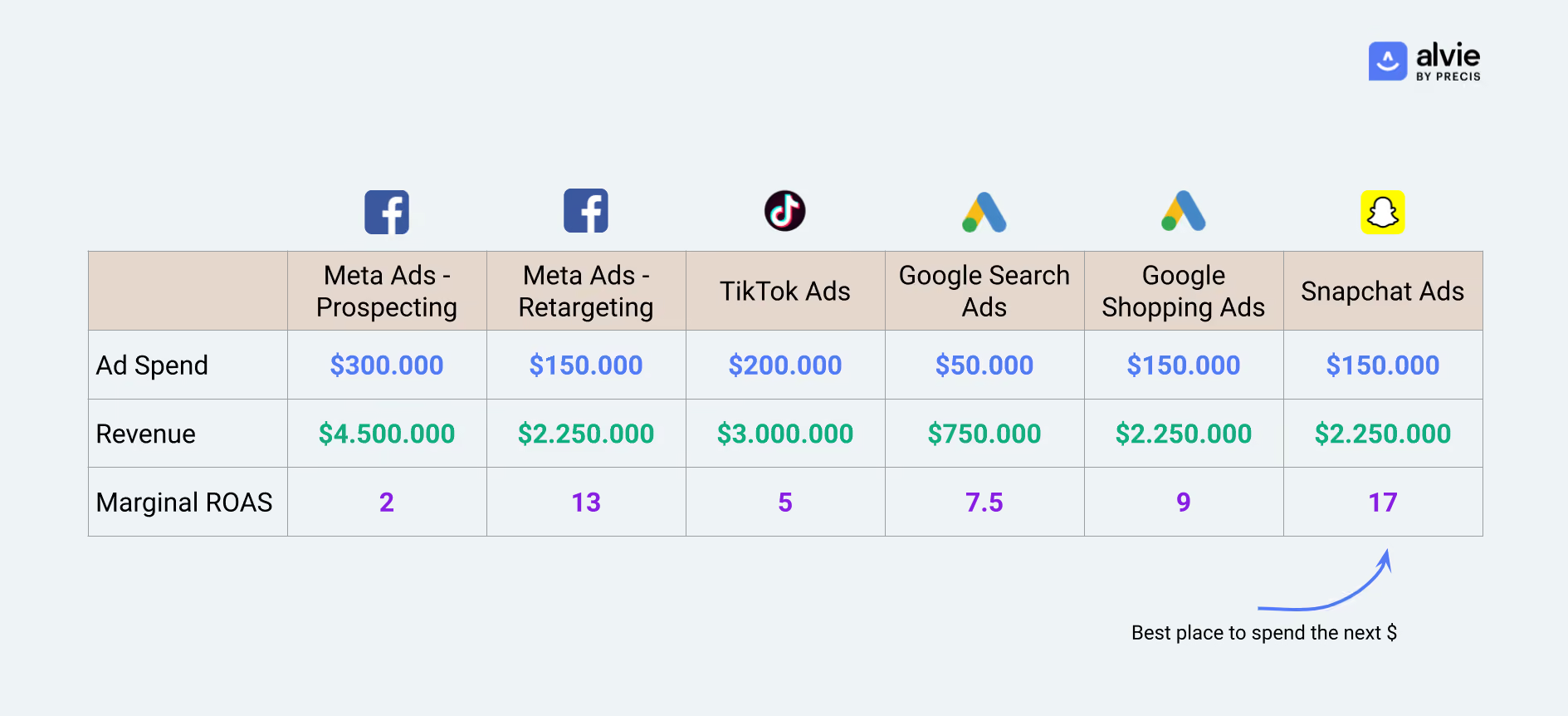
This is a great way to approach it if you're looking to make changes to your overall budget. However, in many cases, the overall marketing budget isn't changing on a day-to-day basis, so what can we use the marginal ROAS for in our operations?
In the "perfect world", the marginal ROAS should be exactly the same across all of our campaigns. If that's the result of our calculations, we'll know our budget is perfectly divided and we'll be getting the most possible Revenue out of our budget.
That's rarely the case, though, but marketers can utilise this knowledge to move the budget from channels with a low marginal ROAS to one where we will get more out of the budget.
Because marketing efforts almost always lead to diminishing returns, there is a point where the budget allocation across your channels becomes optimal.
While you could find the optimal split between channels through trial and error, simulations can also achieve it. In the GIF below you can see a simplified example of how such simulations can be conducted to find the optimal distribution of your budget to achieve the most revenue 👇

In conclusion, understanding and utilising marginal ROAS allow you to make data-driven budgeting decisions that maximise revenue. You can optimise your media mix for the best possible return on investment by continuously analysing this metric across channels.
Doing all of these things every day/week is not a small task. That's why we built the Budget Optimiser into Alvie. It's an end-to-end solution, from data collection through the modelling and simulations described in this article, to give you daily insights into the optimal distribution of your budget.
If you want to learn more about the Budget Optimiser you can click here to schedule a demo with someone from our team! 🤞
Authors

Jonas Østergård Bæk
Head of Tech Product
Jonas Østergård Bæk
Head of Tech Product

